
Google Merchant Center - Assign Access.
Like the other Google services, Google Merchant Center allows for multiple users to access the one account.
In order to grant a new user access to your Google MerchantCenter follow these steps:
- Sign in to your Merchant Center account at https://merchants.google.com/.
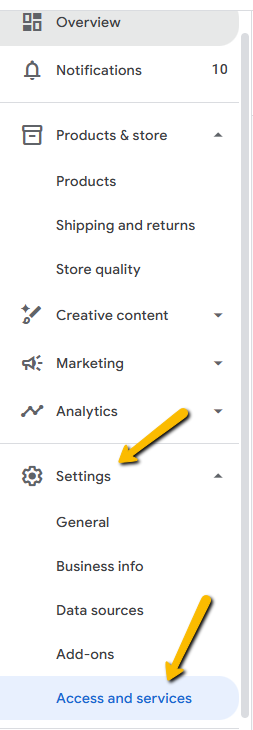
- Click on the ‘Settings’ in the left-hand side panel and select ‘Access and services'.
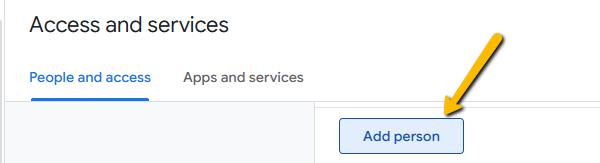
- Once within the ‘Access and services’ page, simply click on the ‘Add person’ button to add a new user.
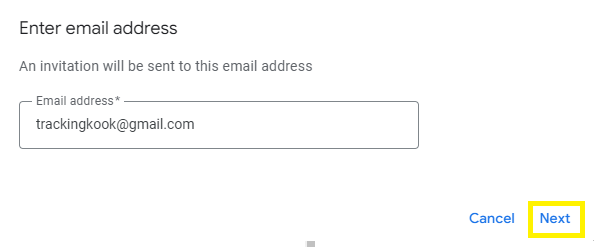
- Insert the email address of the user you wish to invite (for Kook, add [email protected]), and then select 'Next’.
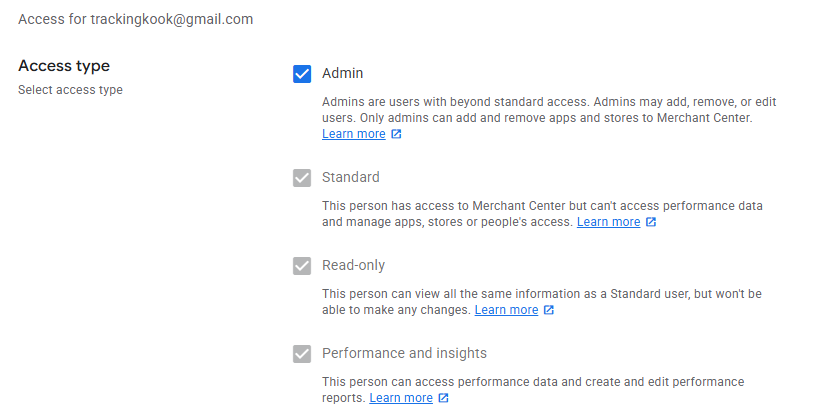
- You will be taken to the access type screen for the new user. Update the User access to Admin and click on Add User.
Great job! You’ve added us as an admin to your Google Merchant Center. We’ll now be able to continue setting up the account in preparation for your project.
We're ready to move,
are you?
No lock-in contracts.
No outsourcing.
Thank you! Your submission has been received!
Oops! Something went wrong while submitting the form.